
Deciding whether to repair or replace your computer can feel overwhelming, especially when you rely on it daily for work, school, or running a small business in Leon Valley. While newer devices promise faster speeds and modern features, many common computer problems can be fixed affordably, extending your system’s life for years. Understanding the true condition of your computer — and the real costs involved — helps you make a smart, budget-friendly decision instead of rushing into an unnecessary purchase.
In this guide, we’ll walk through computer lifespan expectations, repair-worthy issues, when replacement makes sense, and special considerations for Leon Valley residents who depend on reliable technology year-round.
How Long Should a Computer Last?
Most computers are designed to last longer than many people expect, especially when maintained properly and upgraded strategically.
Desktop Lifespan vs Laptop Lifespan
Desktop computers typically last 5 to 8 years or more, largely because their components are easier to replace and upgrade. Hard drives, memory, graphics cards, and even processors can be swapped out to improve performance without replacing the entire system.
Laptops usually have a shorter lifespan, averaging 3 to 6 years, due to compact design, battery wear, and limited upgrade options. However, replacing storage drives, batteries, and memory can still add several productive years when done early.
How Usage Affects Computer Longevity
How you use your computer matters just as much as its age. Light tasks like browsing, email, and document editing put minimal strain on hardware, while gaming, graphic design, video editing, and business software require far more processing power.
Systems used daily for heavy workloads wear out faster, especially if cooling systems clog with dust or storage drives approach capacity. Regular maintenance and timely upgrades dramatically improve long-term reliability.
Signs Your Computer Is Worth Repairing
Many frustrating computer problems don’t mean your system is outdated — they often point to affordable fixes that restore speed and stability.
Slow Performance Caused by Outdated Hardware
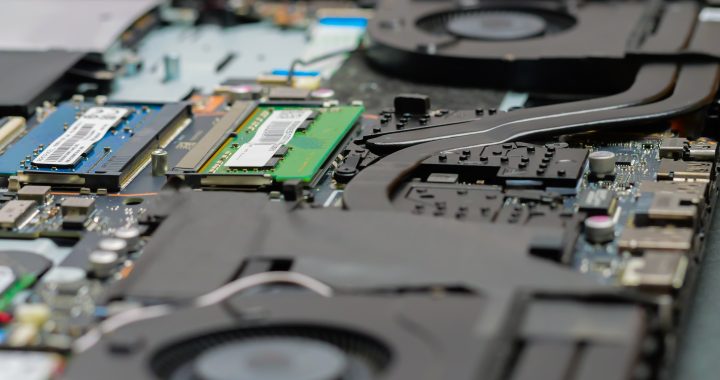
Slow boot times, freezing programs, and constant lag often come from aging hard drives or insufficient memory. Replacing a traditional hard drive with a solid-state drive (SSD) and adding more RAM can transform a sluggish machine into one that feels brand new for a fraction of replacement cost.
Battery, Screen, or Keyboard Issues
On laptops, worn batteries that won’t hold a charge, cracked screens, or malfunctioning keyboards are common — and usually inexpensive to replace compared to buying a new device. These repairs restore full usability without touching the core system.
Virus, Malware, or Software Problems
Pop-ups, crashing programs, mysterious slowdowns, and security warnings are often caused by malware infections or corrupted operating systems. Professional virus removal, system cleanup, and software repairs can eliminate problems completely and improve performance instantly.
Storage or Memory Upgrades That Extend Lifespan
When your computer constantly runs out of space or struggles to multitask, hardware upgrades offer major improvements. Increasing storage capacity or upgrading RAM extends functionality for years, especially for remote workers and students.
When Replacing Your Computer Makes More Sense
While repairs are often the smarter option, there are times when replacement becomes the more practical investment.
Repair Costs Exceed the Value of the Computer
If major components like the motherboard or processor fail on very old systems, repair costs may approach or exceed the price of a new device. In those cases, replacement offers better long-term value.
Hardware Is No Longer Supported
Older computers may not support current operating systems, security updates, or modern software. Without updates, systems become vulnerable to cyber threats and incompatible with essential applications.
Frequent Breakdowns and Ongoing Issues
When repairs become constant and new problems surface every few months, replacement may save money and frustration in the long run.
Your Computer Can’t Handle Modern Software
If your system struggles to run basic programs, video conferencing tools, or updated business applications even after upgrades, its hardware limitations may have reached the end of usefulness.
Repair vs Replacement Cost Comparison
Understanding real-world costs makes the decision much easier.
Typical Computer Repair Costs
Common repairs such as virus removal, SSD upgrades, battery replacement, screen repair, or memory upgrades typically range from $80 to $300, depending on parts and labor. These fixes often restore full performance and reliability.
Cost of Buying a New Laptop or Desktop
Quality new computers generally range from $600 to $1,500+, especially if you need strong performance for business tasks, design work, or multitasking.
When a Simple Upgrade Beats Replacement
Upgrading storage and RAM often costs under $200 and delivers massive speed improvements, making replacement unnecessary for many users.
Special Considerations for Leon Valley Residents
Living and working in South Texas brings unique technology challenges.
Remote Work and Home Office Needs
With more professionals working remotely, dependable computers are critical. Slow systems, unreliable Wi-Fi, and crashing software directly affect productivity and income, making proactive maintenance and timely repairs especially important.
Heat, Dust, and Environmental Wear in South Texas
High temperatures and dust buildup accelerate hardware wear, clog cooling systems, and cause overheating. Regular cleaning and cooling system maintenance extend hardware lifespan significantly in Leon Valley’s climate.
Small Business vs Personal Computer Use
Business systems often run longer hours and store valuable data, making performance upgrades, security services, and professional maintenance essential for avoiding downtime and data loss.
Get an Expert Opinion Before You Decide
Before replacing your computer, a professional diagnostic can reveal whether affordable repairs can restore performance.
Professional Diagnostics Can Save You Money
Technicians can identify failing parts, malware issues, overheating problems, and performance bottlenecks quickly — often uncovering simple solutions instead of full replacement.
Honest Repair Recommendations from a Local Shop
A trusted local repair shop will explain all options clearly, outlining repair costs versus replacement value so you can choose what makes the most financial sense.
Computer Repair Near Leon Valley You Can Trust
The Computer Shop has been helping Leon Valley residents, home offices, and small businesses keep their computers running smoothly for decades with fast service and honest recommendations.
Fast Turnaround from Our Vance Jackson Location
Conveniently located near Leon Valley, their Vance Jackson shop offers quick diagnostics, same-day repairs for many issues, and affordable upgrade solutions that save customers hundreds compared to replacement.
Serving Leon Valley, Castle Hills & Surrounding Areas
From personal laptops and gaming PCs to business systems and networks, they provide comprehensive computer repair, performance upgrades, virus removal, and IT solutions across the local community.
Frequently Asked Questions
Is it cheaper to repair or replace a laptop?
In most cases, repairs such as battery replacement, storage upgrades, virus removal, or screen fixes are far cheaper than purchasing a new laptop. Replacement usually makes sense only for very old systems or severe hardware failures.
Can upgrading RAM or an SSD really help?
Absolutely. SSD upgrades drastically improve boot speed and overall responsiveness, while additional RAM allows smoother multitasking. Together, these upgrades often make older computers feel brand new.
How old is too old for a computer repair?
Generally, computers older than 7–8 years may struggle to run modern software. However, many systems still benefit from upgrades and repairs, depending on the hardware’s condition and usage needs.
Making the Smart Computer Decision
Choosing between repairing and replacing your computer doesn’t have to be complicated. Many common issues are affordable to fix and can add years of reliable performance, especially with smart upgrades and professional maintenance. For Leon Valley residents, getting expert diagnostics before replacing a system often saves significant money while keeping technology running efficiently.
If your computer is slowing down, overheating, or acting up, a quick professional evaluation could be the smartest first step toward restoring performance without unnecessary replacement costs. Contact us Today!